

Hey, Rahul here! 👋 Each week, I publish long-form ML+AI posts covering ML, AI, and System design for MLwhiz. Paid subscribers also get how-to guides with full code walkthroughs. I publish occasional extra articles. If you’d like to become a paid subscriber, here’s a button for that:

This is the post-training lab in the hands-on track of the genAI Fundamentals series. The main track explains the ideas; the labs make you build them.

A few posts back we walked through the whole theory in Post-Training 101: the entire theory for turning a base model into an assistant, covering SFT, RLHF, and DPO, with the math and the intuition behind each of these techniques. That post was about understanding why it all works. This one is about running the whole damn thing yourself.
So that’s what we’re doing today.
We’ll take a real base model, small enough that it can run on a single GPU, ask it a simple question, and see how it performs.
Then, in two stages, we’ll turn it into something that is genuinely more helpful. We will do it in 2 stages:
Stage one is SFT (supervised fine-tuning), which teaches the model to answer and then stop.
Stage two is DPO (Direct Preference Optimization), which teaches it which of two answers is better.
I’ll skip the heavy math this time around—you can check out the previous post if you want to dig into the equations.
Let’s look at how the code comes together.
1. The Plan and the Setup
So here’s the plan. We take a base pretrained model, run SFT on it until it answers instead of rambling, then run DPO, so it will learn which of two answers is better.
We’ll be using Qwen3.5-0.8B-Base. I took a lot of time deciding which model will be the best model for this post. I wanted a model that is new, small enough, and works on a single GPU.
Also, just note that Qwen ships a base and an instruct variant at every size, and we want to start with the base one, because post-training it ourselves is the point. For example, this is the Qwen3.5 family:
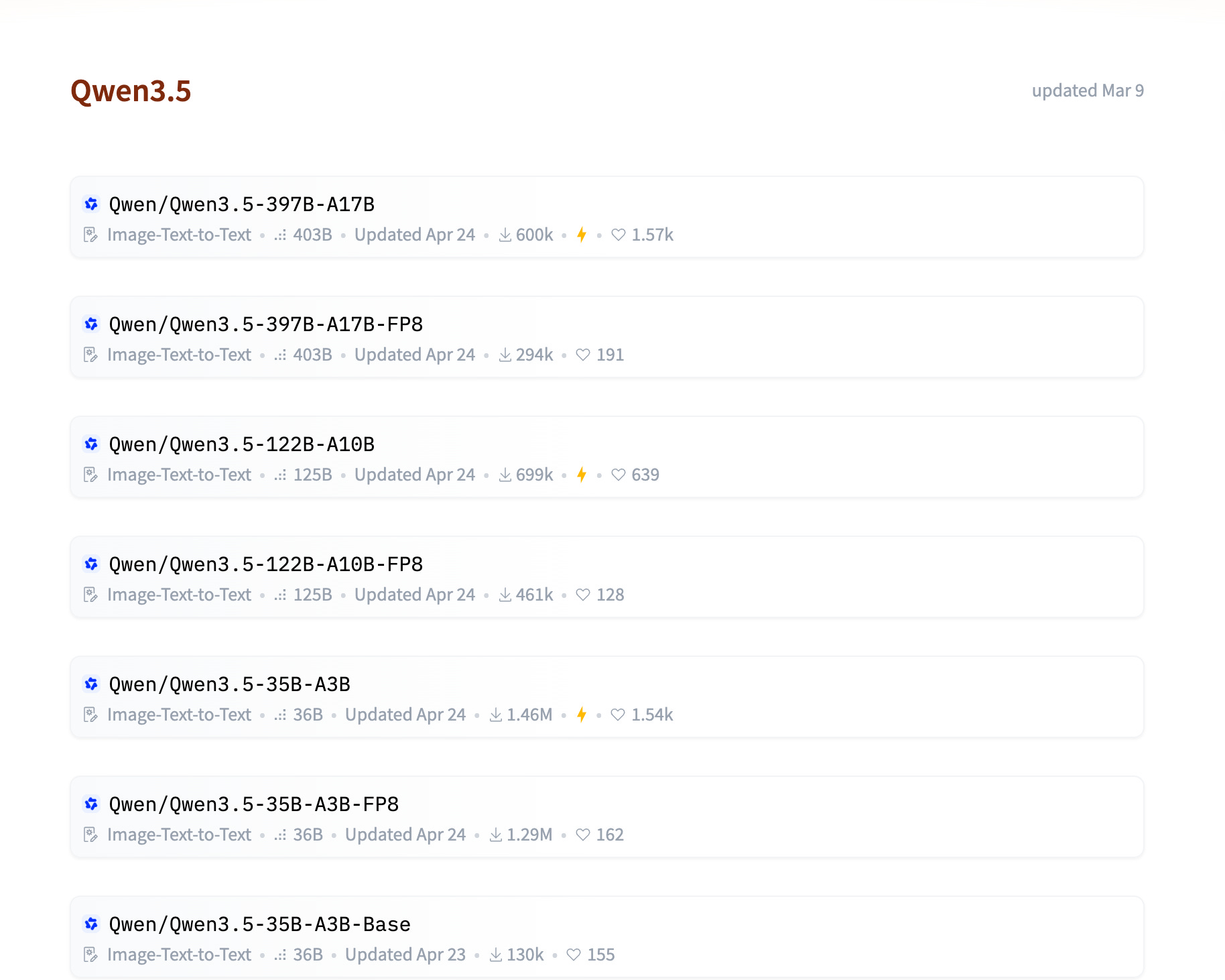
Their model card for Qwen3.5-0.8B-Base says: “The intended use cases are fine-tuning, in-context learning experiments, and other research or development purposes, not direct interaction.”
These are the HuggingFace libraries we’ll use:
transformersloads the model and its tokenizer, the thing that turns text into the integer tokens a model actually reads.datasetspulls training data from the HuggingFace Hub and streams it efficiently.peftis Parameter-Efficient Fine-Tuning: it lets us train small LoRA adapter matrices instead of all 0.8B weights. (Full mechanics in my PEFT guide.)trlis HuggingFace’s post-training library. We useSFTTrainerfor Stage 1 andDPOTrainerfor Stage 2.
Which gives us the imports for the whole notebook:
import gc
import torch
from datasets import load_dataset
from peft import LoraConfig, PeftModel
from transformers import AutoModelForCausalLM, AutoTokenizer
from trl import DPOConfig, DPOTrainer, SFTConfig, SFTTrainer, extract_prompt
I wanted this to be something you could point at your own data, not just read, so everything in the notebook worth changing from data to params lives in one notebook cell instead of being scattered:
MODEL_NAME = "Qwen/Qwen3.5-0.8B-Base"

DATASET_NAME = "yahma/alpaca-cleaned"
DATASET_SPLIT = "train[:5000]"      # 5,000 rows keeps the run short

PREFERENCE_DATASET_NAME = "trl-lib/ultrafeedback_binarized"
PREFERENCE_SPLIT = "train[:8000]"   # filtered down to PREFERENCE_PAIRS below
PREFERENCE_PAIRS = 2000
MAX_REPLY_TOKENS = 256              # drop pairs whose replies are longer than this
MAX_LENGTH_GAP = 64                 # drop pairs whose two replies differ by more

# Every stage writes to its own folder, so runs never overwrite each other.
RUNS_DIR = "runs"
FULL_FT_DIR   = f"{RUNS_DIR}/full-ft"      # full fine-tune: a complete model
LORA_SFT_DIR  = f"{RUNS_DIR}/lora-sft"     # LoRA SFT: adapter only
MERGED_SFT_DIR = f"{RUNS_DIR}/sft-merged"  # LoRA SFT merged into the base: complete model
DPO_DIR       = f"{RUNS_DIR}/dpo"          # DPO: adapter only, on top of sft-merged
FINAL_DIR     = f"{RUNS_DIR}/final-dpo"    # SFT + DPO merged: complete model

MAX_NEW_TOKENS = 500

# The SAME questions at every stage, so the outputs are directly comparable.
QUESTIONS = [
    "What is a good name for a coffee shop?",
    "Explain what a hash map is in one sentence",
    "I keep procrastinating on a big project. Any advice?",
]
A quick note on config hygiene: Hardcoding your hyperparameters into a single cell isn't just for neatness—it saves you from the classic pain of having training logic scattered across five different files. If you can't read your entire experiment setup in one scroll, your config is too complex.
